Server health and network drift
The signals the Sefthy Agent sends from the protected server, where you read them in the Console and what to do when the machine's network no longer matches the DR plan.
The Sefthy Agent installed on the server sends the Console a report on the state of the machine at regular intervals. It answers one question. If the disaster happened right now, would the restore actually start?
Anteprima video temporaneamente non disponibile.
Apri il file direttamente →What the agent looks at
- Connector visible from the LAN. The agent looks for it on the customer network. This is a different view from the Online dot, which comes from the cloud through the tunnel.
- VSS, Windows only. Lists the shadow copy writers and flags the ones in error. A backup can succeed with a broken writer and still be inconsistent.
- Network drivers, Windows only. Checks that the network drivers put in place during onboarding are still there. On Linux they are already part of the system and the section does not appear.
- Disk space. Flags the fixed volumes that are nearly full.
- System clock. Flags a server clock that has drifted out of sync.
- Reboot pending, Windows only. A machine waiting for a reboot can lose the freshly installed driver.
- DNS. Tries to resolve the Console and backup storage addresses.
The agent also reports other backup products found on the server, the most frequent cause of VSS conflicts. That list stays with Sefthy support.
Where you read them
In the Connector tile of the DR page, under the status dot. If the server cannot see the connector you get the amber line Not visible from the server, with a note that the detection can lag by a few minutes. If it is the agent that goes quiet you read Health not up to date, and the tooltip says since when.
The rest shows up next to a backup that went wrong. Open the Latest Tasks card, click the row of the failed backup and under the log you find the block Likely causes from the server, one line per unhealthy section. It is the state of the server right now, not at the time of the backup.
When a signal is red
- Connector unreachable from the server. Check that connector and server sit on the same network and that nothing in between keeps them apart. Until the server sees it, a cloud restore through the connector has no bridge to the LAN.
- VSS in error. The detail lists the writers that fell over. Restart the service that owns them, or uninstall the other backup product competing for them.
- Network drivers not installed. Reinstall the Sefthy Agent from the DR menu, the same procedure puts the driver back. See Reinstalling and updating the Sefthy Agent.
- Disk almost full. The line says how many GB are left out of how many. Make room before the backup stops.
- Clock out of sync. Fix NTP on the server.
- Reboot pending. Schedule the reboot with the customer, do not leave it there for weeks.
- DNS not resolving. Check the resolvers on the server. They are the ones the agent uses to talk to the storage.
Network drift
A restore recreates the network cards on record in the DR plan, not the ones the server has today. If somebody changes an address, moves a VLAN or swaps a card without telling the Console, the restored copy comes up with the wrong network.
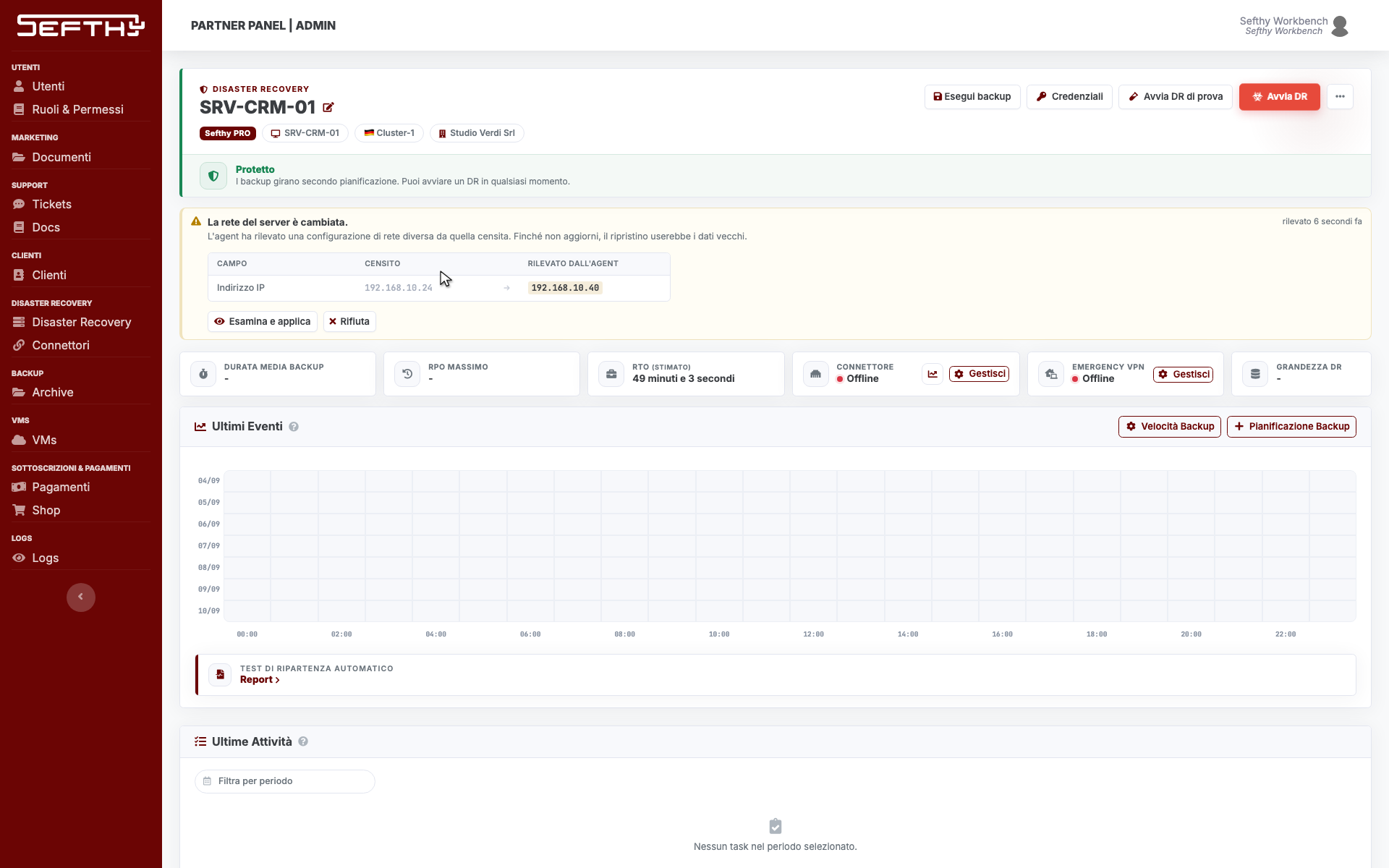
The agent sends the real list of cards. The Console compares it with the record on IP address, netmask, gateway, VLAN and MAC, and when something does not match it writes a proposal instead of applying it on its own.
On the DR page you get the amber note The server network has changed. with the columns Field, Registered and Detected by the agent, one row per value that differs. A field never recorded reads not registered, a card the agent no longer sees absent on the server. In the DR list the same warning is a chip on the row.
Accepting or rejecting
- Read the table and decide whether the detected value is the right one.
- Click Review and apply. The DR Settings window opens, already filled in with the proposed values and with the changing fields highlighted.
- Check CPU and RAM in the same window, then confirm. The cloud networks of the DR realign by themselves.
If the right machine is the one on record, click Reject. The proposal does not come back until the server network changes again, or until you save a new record from the Settings window.
If the note is not there
The proposal only shows while the DR is idle. With a restore in progress, a local restore open or a suspended DR it stays hidden, together with the Settings window that applies it. It also needs the permission to start a DR.