Partners, expiry dates, stock and statement
The partner profile, access to their DRs, expiring licences, the connector stock and the monthly statement towards Sefthy.
Four pages of the Distribution area that you use after the sale. The order wizard is in The distributor console and orders.
The partner profile
Anteprima video temporaneamente non disponibile.
Apri il file direttamente →Partners lists the partners you serve. Every row carries the count of Channel DRs of that partner. A click opens their profile, where you find:
- Company details, which you can correct yourself with Edit company details. Business name, VAT number, address and administrative email.
- Partner orders, the history of what you sold them.
- The channel licences, split into To assign and Assigned, with the DR each one was spent on.
- The Partner Disaster Recovery instances, when access has been granted.
When you see the partner DRs
Two things have to hold at the same time. The first is origin, you only see the DRs born from your orders or your licences, never the whole estate of the partner. The second is consent, which the partner gives from their own Profile, the Distributor access box, with the Let my distributor see my DRs switch. With the switch off the DR card does not even render, and the Channel DRs list stays empty.
With consent on you open the DR page and do there what the partner would do. Events and activities, device monitor, backup on demand, cloud and local schedules, settings, starting the DR, and even finishing the setup of a DR that is not configured yet. What stays outside your perimeter is deleting the DR, remote assistance and reports over a chosen period. A partner served by a distributor cannot ask for the deletion either, they ask you and you pass it to Sefthy.
Expiring licences
The coverage of a DR is the furthest expiry date among the licences spent on it. Expiries collects the channel DRs about to run uncovered, grouped by partner and sorted by urgency, with the Window filter on 30 days, 90 days or all of them.
The partner gets an email 30, 7 and 2 days before the expiry. On expiry the DR is suspended, still visible but no longer operational. If the suspension drags on, the case is reported to Sefthy. No DR is ever deleted automatically.
To renew you sell a licence of the same plan with a new order, the button is Sell renewal. The partner chains it to the DR, the coverage moves forward and the row leaves this list.
Connector stock
Stock is the only channel the physical connector goes through. Its three tabs, Incoming, In stock and Assigned, follow the unit from the order to the partner.
- New order only asks how many units. Delivery goes to the registered address of your company and the charge lands on the next invoice, inside Economics. There is no card payment.
- The order shows up under Incoming with carrier and tracking. On shipment the serials arrive and become single rows under In stock.
- From In stock you use Assign to partner to record who you handed that serial to. You can add a note.
- On a connector already assigned, Manage offers three actions. Return to stock, hardware replacement with a serial swap, move to another partner.
The assignment is administrative only, it keeps track of who holds the hardware. It generates no billing, the connector is already paid at order time, and it does not touch in any way the connectors the partner configured in the Console.
Statement
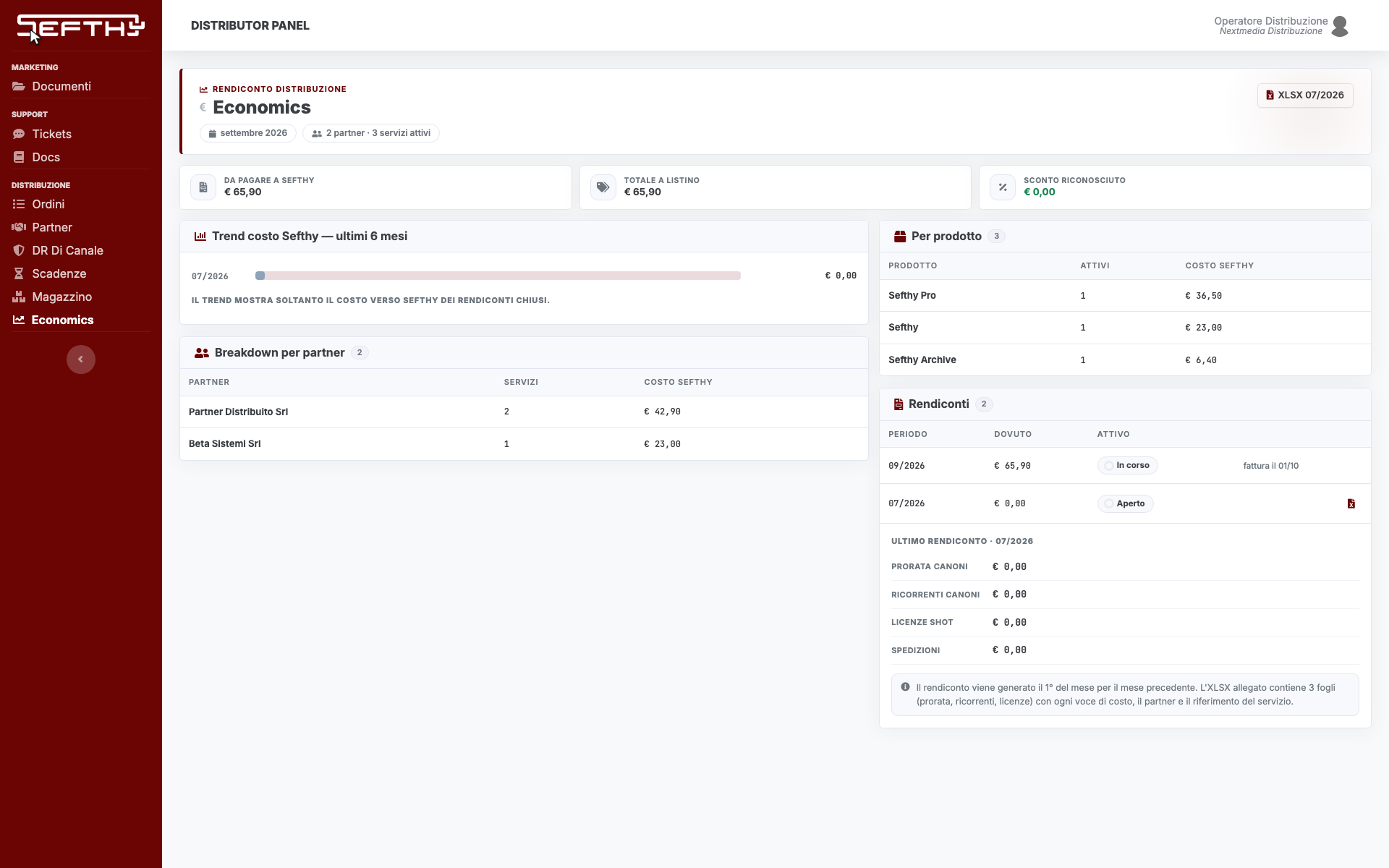
Economics shows the current period with four numbers, what you owe Sefthy, the list total, the granted discount and the count of partners and active services. Below it sit the breakdown by partner and the one by product, plus the trend of the last six months.
The statement of a month closes on the first day of the next one and is never recomputed after that, not even if a DR is renamed or a licence is spent later. From every closed period you download the XLSX, three sheets with the pro-rata fees, the recurring fees and the prepaid licences, each one carrying the partner and the service reference. The name of the end customer never appears in the file.